SAMPLE & SHAPE
Find another side
of your sound.
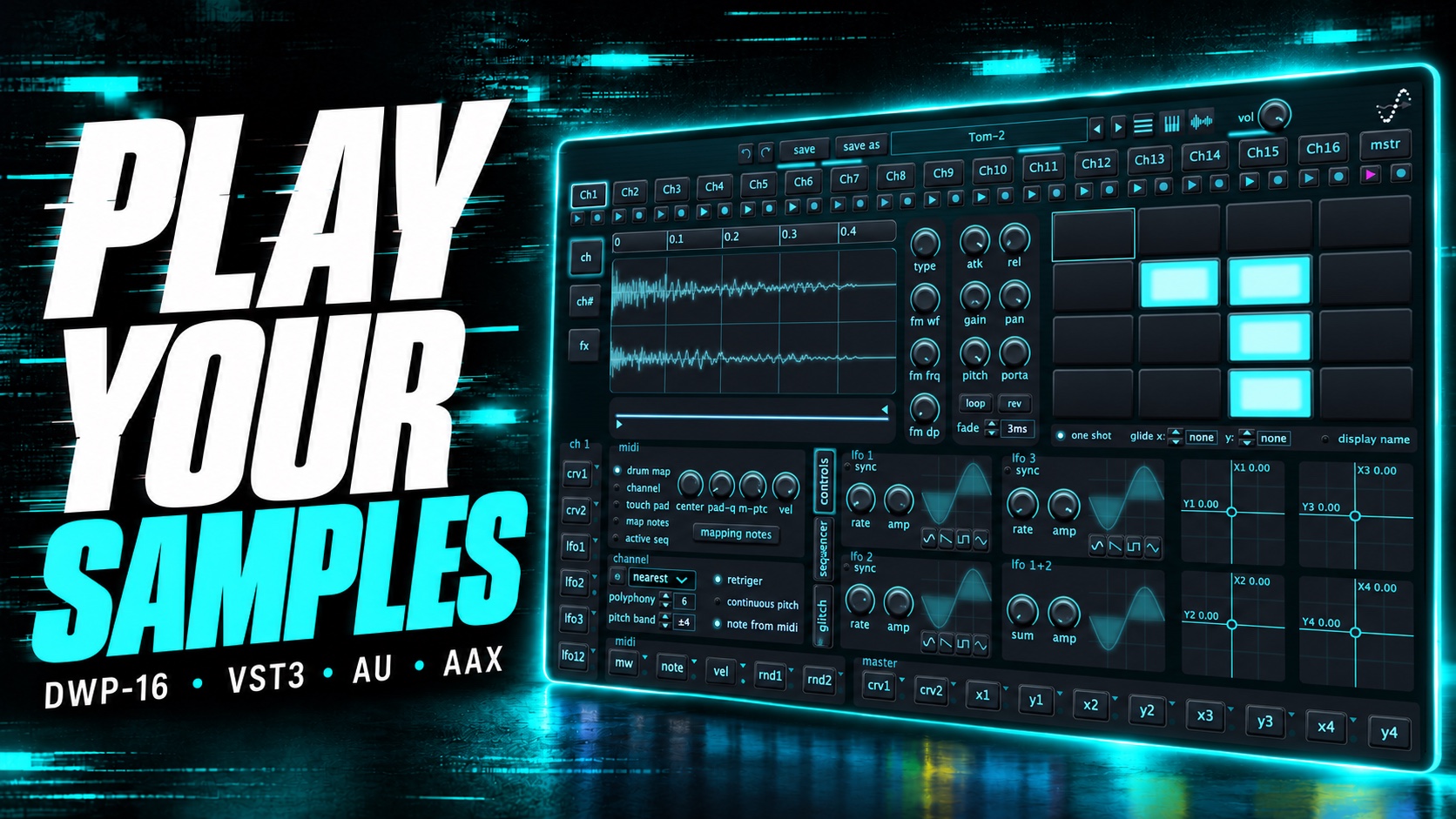
Edit the waveform, set loop points and reverse playback. Explore pitch, portamento and FM synthesis, or draw your own pitch and gain curves.
A sampler. An instrument. Your playground.
Start with a sound. Give it a rhythm.
Then see where your hands take it.
Sixteen channels of sampling, sequencing and sound shaping. All connected. All ready to play.
$49.99USD · Full license
macOS & Windows · Plug-in and Standalone
FROM A SINGLE SAMPLE TO SOMETHING YOURS
Move between detailed editing and hands-on playing without leaving the instrument. A drum hit, a voice or a texture is just the starting point.
SAMPLE & SHAPE
Edit the waveform, set loop points and reverse playback. Explore pitch, portamento and FM synthesis, or draw your own pitch and gain curves.
SEQUENCE & TRANSFORM
Give each channel its own sequencer and up to 32 patterns. Shape velocity, pitch and note length, then explore modulation curves and the glitch engine.
MODULATE & PERFORM
Play the pad matrix, connect LFOs and explore four XY controls. Add character with effects including delay, reverb, distortion, chorus, phaser and flanger.
A DIFFERENT PATTERN FOR EVERY CHANNEL
Sequence pitch, velocity, pan and note length. Draw movement into each step, build variations and let your channels find their own conversation.
COLOR. CHARACTER. A LITTLE CHAOS.
Go from subtle space to a completely different character. Shape your sound with Robo, distortion, chorus, phaser, flanger, filter, delay and reverb.
KEEP THE GOOD PART
Record your performance, capture a sidechain input in your DAW, or record an external input in Standalone.
Drag a recording into a channel and take the idea further.
Explore the workflowLESS READING. MORE LISTENING.
See DWP-16 in action, from the sounds you start with to the performance you make.
YouTube loads only when you choose to play. The video may show an earlier version of the interface.
YOUR STUDIO. YOUR WAY.
A universal installer for your Mac, with plug-in formats for your studio and a Standalone application for playing outside a DAW.
VST3 / AU / AAX / Standalone
Explore Mac downloadsBring DWP-16 into a compatible host, or open the Standalone application and start exploring your samples.
VST3 / AAX / Standalone
Explore Windows downloadsSTART WITH SOMETHING FAMILIAR
Try DWP-16 with your own sounds.